
Today we tried to add web push notifications to a website built with Lovable using Pushpad.
The results should be similar even if you are using other AI app builders / AI coding agents.
We have simply entered this prompt and it worked immediately:
Add web push notifications using Pushpad. Documentation: https://pushpad.xyz/docs
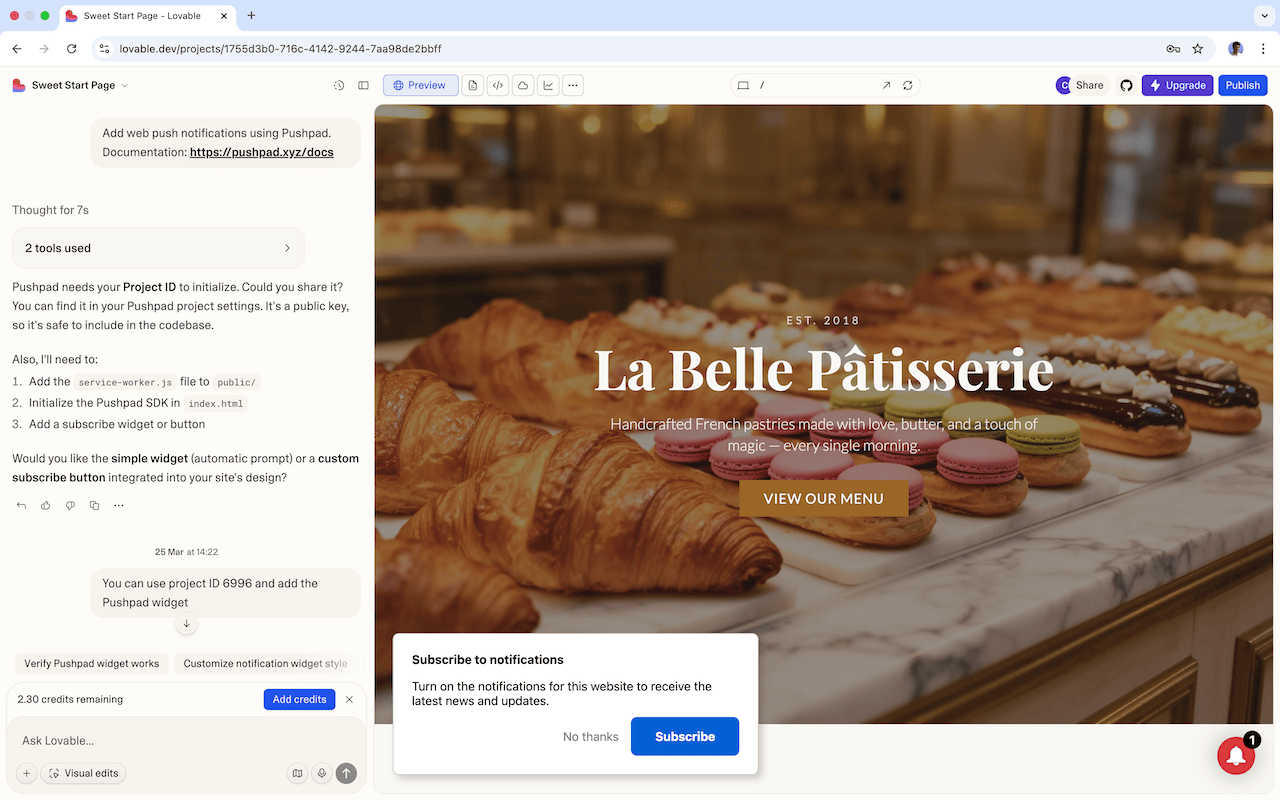
As you can see from the screenshot, the only additional information provided was the Project ID. The Project ID is not a secret and you can safely include it in the frontend. You can find it in the project Settings (you need to sign up to Pushpad and create a project there if you don't have one yet).
If the AI asks what type of integration you prefer, please note that the Pushpad widget is the easiest one to get started (it is just one line of JavaScript and you can customize the appearance from the Pushpad dashboard). Otherwise, if your AI agent is using React or similar, and you want more advanced customizations, you can also build custom components: you can copy these examples and give them to your AI assistant.
After installing Pushpad, you can visit your Lovable website (the domain, not the preview inside the editor) and you should be able to subscribe to web push notifications (click "Subscribe" in the notification prompt). You can also go to the Pushpad dashboard and send a test notification to make sure that you receive it.
Once you see that notifications work properly, you can customize the notification prompt (Settings -> Widget settings) or start sending real notifications to your subscribers, using the the Pushpad dashboard.
After that, if you want to experiment with something more advanced, you can also send notifications automatically from your web app using the Pushpad API (e.g. when a new post is published, when a comment is created, when a message is sent, etc.). We also offer an OpenAPI specification which works very well with AI coding agents (you can include a link to it or copy and paste it into the context).
Feel free to contact our support if you need more specific guidance.